

If you’re searching for “Google Workspace price”, you’re not just looking for numbers.
You’re asking: Is this actually worth paying for as per my current needs— or can I run my team on something cheaper (or free)?
Because on paper:
- Zoho gives you free domain email.
- Google offers free collaboration tools.
- Lark gives an entire suite at $0.
- Microsoft 365 looks cheaper.
So why are so many founders still paying for Google Workspace?
This guide breaks it down without bias:
- Current Google Workspace pricing (2025)
- What you actually get
- Free Google Essentials (what most people miss)
- Zoho real-world limitations (including cold email issues)
- Lark’s learning curve + admin friction
- Insights from Reddit sysadmins and founders
- When paying makes sense — and when it doesn’t
Let’s start with the pricing.
Google Workspace Price (2026 Updated) and it’s Free version
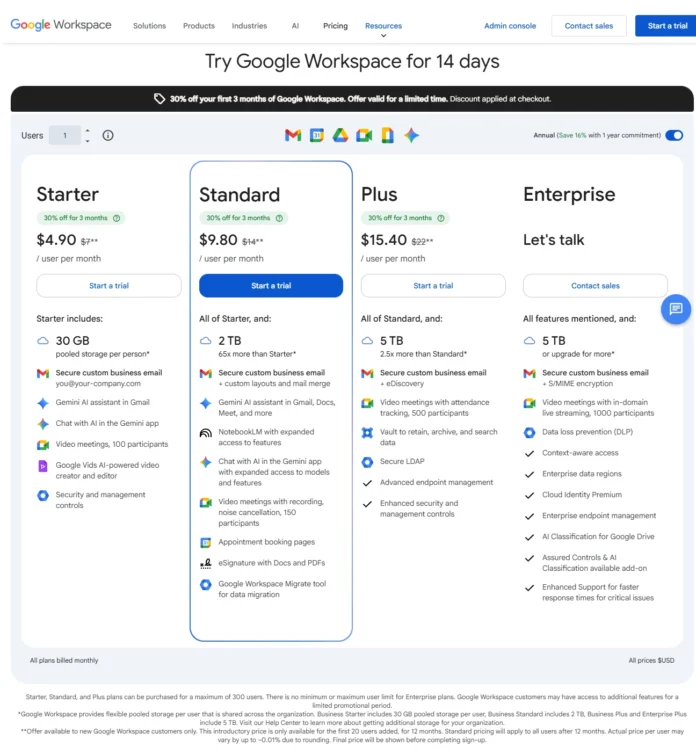
Google Workspace currently offers four main plans and a free version, check next section to learn about free version:
1. Business Starter
~$6–$8 per user/month
- Custom domain email
- 30 GB storage per user
- 100-participant Meet
- Basic admin controls
2. Business Standard
~$12–$14 per user/month
- 2 TB storage per user
- Meeting recording
- Shared drives
3. Business Plus
~$18–$22 per user/month
- 5 TB storage
- Advanced endpoint management
- eDiscovery
4. Enterprise
Custom pricing
For a 5-person startup on Starter:
→ ~$35/month
For 20 people:
→ ~$140/month
That’s when founders start searching for alternatives.
What Most People Don’t Know: Google Workspace Essentials Is Free
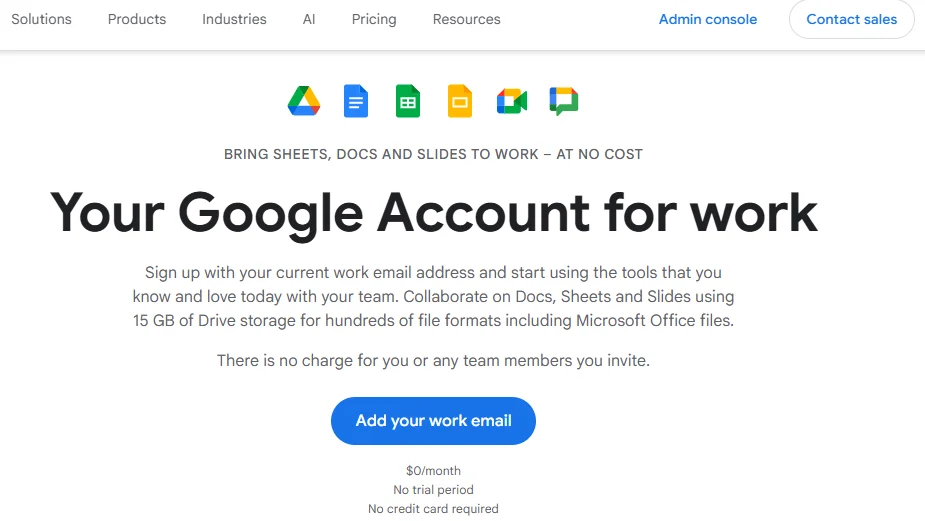
Google offers Workspace Essentials Starter, which includes:
- Google Docs
- Google Sheets
- Google Slides
- Google Drive (15 GB per user)
- Google Meet
- Google Chat
What’s missing?
👉 Gmail
👉 Custom domain email
This is crucial.
You can:
- Use Zoho (free email)
- Use another email provider
- And still use Google Docs/Drive free
Some Google partners suggest this hybrid approach.
So technically:
You don’t need to pay Google for collaboration tools.
You pay Google mainly for:
- Gmail with your domain
- Admin control
- Deliverability reliability
And that changes the decision completely.
Is Google Workspace is Expensive for Small Teams?
In many software reviews sites and platforms such as Reddit one objection and recurring theme is- “Is Google Workspace still worth it for small teams?”
Common concerns:
- Rising prices
- Paying per user feels heavy
- Microsoft 365 looks cheaper
- Zoho offers free email
But here’s what often comes up as concerns :
- Reliability matters.
- Migration pain is real.
- Email deliverability is critical.
When email drives revenue, downtime or spam issues are far more expensive than $6 per user.
Google Workspace Alternatives: What Are Your Real Options?
If you’re researching Google Workspace price, you’re almost always asking a second question: What are the best Google Workspace alternatives?
Not every team needs the full Google ecosystem.
Some want:
- Lower monthly costs
- Free custom domain email
- More privacy-focused infrastructure
- Simpler collaboration tools
- Or just fewer recurring SaaS bills
And realistically, three serious alternatives come up repeatedly in founder and sysadmin discussions:
- Zoho (free domain email + lower-cost plans)
- Microsoft 365 (enterprise-grade but often cheaper per user)
- Lark (all-in-one collaboration suite with aggressive free tier)
Each solves a different problem.
Each introduces different trade-offs.
And none of them are “better” universally — they’re better for specific use cases.
Let’s break them down honestly.
Zoho Mail: The Attractive Free Alternative (With Caveats)
Zoho has positioned itself as the go-to alternative for startups looking to avoid paying for Google Workspace.
On paper, it looks like a no-brainer.
Zoho Free Plan Includes:
- Up to 5 users
- Custom domain email
- 5 GB storage per user
- Webmail access
- Basic admin console
For a small team of 2–5 people, this can feel like a win.
You get:
- Professional email (for example: Contact@alltechmagazine.com)
- No monthly bill
- Basic collaboration tools
- A working business setup
For early-stage founders trying to keep burn low, this works.
Until it doesn’t.
Where Zoho Mail Starts Showing Friction
The problem isn’t the feature list.
The problem is scale and behavior patterns.
Most free-plan comparisons stop at “5 users free.”
But here’s what actually matters.
1. Email Sending Limits & SMTP Restrictions
Zoho explicitly states that its mail services are designed for normal business communication, not bulk or unsolicited outreach.
Zoho enforces strict daily sending limits.
If you:
- Send normal operational emails → fine
- Send client emails daily → fine
- Start doing outbound or cold email → limits hit fast
Accounts may:
- Get temporarily restricted
- Trigger spam detection warnings
- Require manual compliance review
- Face sending throttling
If you want to connect Zoho via SMTP to third-party cold outreach tools, you generally need a paid subscription. Even then, usage policies remain strict.
Zoho’s anti-spam enforcement is aggressive by design.
For agencies, SaaS startups, and outbound-driven teams, this becomes operational friction quickly.
2. Cold Email & Automation Restrictions
Zoho prefers users send campaigns through:
Zoho Campaigns
Or use ZeptoMail for transactional emails.
But here’s the critical distinction:
- Zoho Campaigns is built for opt-in marketing lists — not cold outbound prospecting.
- ZeptoMail is designed for transactional emails (OTPs, receipts), not sales outreach.
Operational constraints include:
- You must send from inside their system.
- Advanced outbound workflows are limited.
- Some third-party outreach tools don’t integrate cleanly.
- Multi-inbox scaling is harder.
- Warm-up infrastructure is less flexible.
If your growth strategy relies on outbound email infrastructure, Zoho’s ecosystem becomes restrictive quickly.
Zoho isn’t built for cold outbound scale — it’s built for compliant communication.
That distinction matters.
3. Deliverability & Spam Filtering Differences
Zoho works.
But compared to Gmail infrastructure:
- Inbox placement can be less consistent.
- Spam filtering isn’t as AI-advanced.
- Sender reputation is weaker globally.
- Proper SPF, DKIM, and DMARC configuration becomes more critical.
When email equals revenue, these small differences matter.
Google’s ecosystem is simply more widely trusted by receiving mail servers.
4. Ecosystem & Integration Depth
Zoho has its own ecosystem:
- Zoho CRM
- Zoho Projects
- Zoho Workplace
And if you operate fully inside Zoho, it works well.
But compared to Google Workspace:
- Fewer native SaaS integrations
- Smaller third-party tool compatibility
- Less seamless collaboration with external partners using Gmail
- Lower ecosystem familiarity among clients
If most of your clients use Gmail, Google-to-Google communication tends to feel smoother and more predictable.
When Zoho Mail Is a Smart Choice
Zoho makes sense if:
- You’re under 5 users
- You’re pre-revenue
- Email volume is low
- Outbound is not core to your strategy
- Budget control is critical
It’s a strong bootstrapping solution.
When Zoho Starts Breaking Down
You’ll feel the pressure if:
- You scale outbound
- You need high inbox placement
- You rely on heavy SaaS integrations
- You want long-term frictionless growth
- You don’t want compliance or sending-limit surprises
At that point, many founders migrate to Google Workspace.
Not because Zoho failed.
But because growth exposed its limitations.
When revenue depends on inbox placement, this matters.
Lark: Free, Feature-Rich — But Friction Heavy
Lark offers an impressive free plan:
- Chat
- Docs
- Meetings
- Cloud storage
- Admin tools
On paper, it looks like Google Workspace for free.
But real-world friction shows up:
1. Learning Curve
Teams used to Google:
- Resist switching
- Need onboarding time
- Face UI differences
That cost is invisible — but real.
2. Admin Login Friction
Users often require:
- Verification codes each time employee logs in.
- Extra authentication steps with no option to change as an admin.
For growing teams, this becomes operational overhead.
3. Deliverability Sensitivity
If:
- DKIM
- SPF
- DMARC
Are not perfectly configured, Lark emails may land in spam. That’s the case with any email service provider but Lark emails are not that trusted since it is not widely used.
Gmail’s ecosystem is more forgiving and widely trusted.
Microsoft 365: The “Cheaper” Enterprise Alternative
Microsoft 365 often undercuts Google on price.
Pros:
- 1 TB storage on lower plans
- Desktop Office apps
- Strong enterprise features
Cons:
- Interface preference varies
- Real-time collaboration slightly less fluid
- Ecosystem lock-in different
For some teams, Microsoft makes more sense.
For Google-native founders, switching feels unnatural.
Deliverability: The Hidden Deciding Factor
This is where most comparison articles fail.
They talk features.
They ignore inbox placement.
Google’s infrastructure:
- Massive sender reputation
- Best-in-class spam AI
- Broad trust from receiving servers
For:
- Cold outreach
- B2B sales
- Client communication
Google Workspace consistently outperforms cheaper providers.
That’s why many agencies still stick with it.
Cost Breakdown: What You’re Actually Paying For
| Platform | Monthly Cost (5 users) | Real Risk |
|---|---|---|
| Google Workspace Starter | ~$35 | Minimal |
| Zoho free | $0 | Sending limits, warm up max out the limits sometimes |
| Lark Free | $0 | Friction, deliverability issues |
| Microsoft 365 Basic | ~$30 | Ecosystem shift |
Now ask:
If one lost deal equals $1,000…
Is saving $35/month worth the risk?
Zoho is good for firm’s that do not reply on outbound emails much.
When Google Workspace Is Worth It
Choose Google Workspace if:
- Email deliverability matters
- You run outbound sales
- You want seamless integrations
- You value admin simplicity
- You need reliability at scale
Choose alternatives if:
- Budget is zero
- Email volume is low
- You’re pre-revenue
- You don’t need domain email
The Hybrid Strategy (What Smart Founders Do)
Some teams:
- Use Zoho for free domain email
- Use Google Workspace Essentials for collaboration
- Upgrade only when needed
This reduces early burn.
But once email becomes mission-critical, most migrate to Google Workspace.
Final Verdict: Is Google Workspace Price Justified?
If you’re:
- A solo freelancer → maybe not yet.
- A startup scaling outbound → yes.
- An agency sending 100+ emails daily → absolutely.
- A company where email equals revenue → it’s cheap insurance.
Google Workspace isn’t the cheapest.
It’s the most frictionless.
And friction is expensive.
FAQS
Is there a free version of Google Workspace?
There is no free plan that includes custom domain email.
However, Google offers Workspace Essentials Starter, which includes:
Google Docs
Google Sheets
Google Slides
Google Drive (15 GB)
Google Meet
Google Chat
It does not include Gmail or custom domain email.
Is Google Workspace worth it for small businesses?
For businesses where email drives revenue, Google Workspace is usually worth the cost because of:
High deliverability
Reliable infrastructure
Seamless integrations
Strong admin controls
For very small teams with low email volume, free alternatives may work initially.
What are the best Google Workspace alternatives?
Popular alternatives include:
Zoho Workplace
Microsoft 365
Lark
Proton Mail + collaboration tools
Neon Mail
Each has trade-offs in pricing, deliverability, and scalability.
